Full-stack software engineer building useful tools. Constantly learning, with a habit of connecting dots across different domains.
NOTES 13
OPEN →- 01
- 02
- 03
- 04
- 05
How I Automated My Translation Workflow with Whisper and a Local LLM
TL;DR I was repeating the same work for every chapter of an Islamic lecture series: transcribing the Urdu audio, translating it into English, and inserting the original Arabic passages in the right places. So I built a local pipeline with Whisper, Ollama, and Gemma to automate it. This post explains how I built that workflow, what broke along the way, and how I added checks to make sure the output matched my expectations. I later compared the result with Claude Sonnet—not to decide which model is “smarter,” but to understand how well my local automation worked. Sonnet was faster and more accurate in that test, while the local pipeline gave me a repeatable process I could run on future chapters.
The project
I was attending a lecture series on Ibn al-Qayyim’s Al-Da’ wal-Dawa’ (“The Disease and the Cure”). The lectures were in Urdu. Although I took notes throughout each one, I wanted something that would give both me and the other participants a quick recap of the complete lecture.
My next thought was to write a blog post for every lecture. This idea comes to me every time I start a lecture series, but I usually drop it because of the time involved. This time, I thought: why not use AI?
For privacy reasons, I did not want to upload the lecture recordings to a hosted AI lab service. Initially, I used a private cloud GPU and Gemma 3B as part of the transcription workflow. I would then paste the transcript into Sonnet or Gemini and ask it to translate the material into English and structure it as a blog post. After that came the real work: correcting errors, reformatting, restructuring, and rephrasing the output. I also added the relevant Arabic passages so that everyone could catch up more easily.
For every chapter, I have to repeat the same three steps:
- Transcribe the Urdu audio.
- Translate the transcript into faithful English without summarizing or adding anything.
- Insert the original Arabic passages where the lecturer discusses them.
I wanted to automate as much of the process as possible and run it locally.
So I built a pipeline using Whisper for transcription and Gemma through Ollama for
translation and Arabic placement. The implementation is in
transcribe.py. This post describes how I built it, what went
wrong, and how I improved it until it could produce a useful first draft for each new
chapter.

Building the pipeline
I did not build the whole pipeline at once. I started with translation, tested different local models, and improved the prompt using the mistakes I found. Once the translation was usable, next I experimented on automatically placing the Arabic passages. I also added checks to catch changes made during placement and prevent duplicate Arabic insertions.
Getting the translation prompt right
The translation prompt was simple: translate everything, do not summarize, keep names consistent, and return only the translation.
It mostly worked, but small problems appeared. In one result, Gemma produced:
“a solution exists for all calamities and a treatment exists for all illnesses_problems”
The merged words suggested that the model was uncertain and had included both choices. Other attempts changed sentence structure, mistranslated names, or added details that were not present in the source.
I updated the prompt based on these actual mistakes. The new instructions made it clear that:
- every source sentence must appear in the translation;
- nothing should be summarized, omitted, or invented;
- names and book titles must remain consistent; and
- uncertain names should be transliterated instead of guessed.
These rules are preserved in the pipeline’s
TRANSLATE_PROMPT.
I then ran the same passage through Gemma again. With the model and input unchanged, the improved prompt raised my assessment of the result from 7/10 to 8/10.
This showed me that choosing a model was only part of the work. I also had to define exactly what a successful translation looked like.
Choosing a local model: the bake-off
Before building the rest of the pipeline, I needed to decide which local model would handle the translation.
Each model was given the same passage about 5,800 characters of mixed Urdu and Arabic and speed and faithfulness was compared to the source. All four models were run locally through Ollama. The tests began with Ollama’s default generation settings; I later changed settings only while troubleshooting qwen3.5:9b.
| Model | Time | Rating | What happened |
|---|---|---|---|
| gemma4:12b | 1m 50s | 7/10 | Stayed close to the source, with only a few small errors |
| qwen2.5:7b | 35s | 4/10 | Mistranslated the opening and wrote the same name in three different ways |
| llama3.1:latest | 43s | 2/10 | Summarized instead of translating and invented a book title and Qur’an citation |
| qwen3.5:9b | 3m 16s after troubleshooting | 1/10 | Eventually fell into a repetition loop |
The fastest model was not necessarily the most useful. Both qwen2.5 and llama3.1 returned clean-looking English quickly, but they changed or invented information. That is especially dangerous in a translation because the output can sound convincing even when it is wrong.
Gemma was slower, but it followed the source more closely and introduced fewer serious
errors. It was not perfect, but it gave me the best starting point for the pipeline, so
I chose gemma4:12b.
The qwen3.5:9b problem
qwen3.5:9b initially ran for several minutes but returned no visible translation. The model’s response was being placed in a separate reasoning field, while the normal content field remained empty. Disabling reasoning through Ollama’s OpenAI-compatible endpoint did not work because of an upstream Ollama bug.
Using Ollama’s native API fixed the empty-response problem, but longer translations still fell into repetition loops. Because of these two issues, I decided not to use qwen3.5:9b for the pipeline. The final code retains the resulting safeguards: it uses Ollama’s native chat endpoint, disables thinking, and caps generated output (configuration, request payload).
This project used Ollama, but based on my broader experiments since then, I would now prefer Unsloth for similar local-model workflows. I have generally found it to be the better option for running and experimenting with models. The rest of this post still describes the Ollama-based setup I actually used for this project.
The placement pipeline’s first run
Once the translation step was working, next was automating the placement of the original Arabic passages.
In the first version, every English batch was given the complete list of Arabic passages and asked to decide where they belonged. The prompt did not clearly say that a batch might contain no matching passage.
Because of that, Gemma tried to place something in every batch, even when there was no real match. One Arabic paragraph that should have appeared only once was inserted six times across the chapter.
This was not simply a model mistake. The pipeline itself encouraged the wrong behavior: it kept offering the same passages repeatedly and did not give the model a clear option to reject them.
I changed the process so that the model had to evaluate each remaining Arabic passage independently for the current English batch. The prompt explicitly allowed “no match,” and after a passage was placed, the script removed it from the remaining pool. Both rules are visible in the placement prompt and the shrinking-pool logic.
On the next run, all six Arabic passages were inserted exactly once, with no duplicates. This was the first major design correction in the placement pipeline.
Adding a self-check
The pipeline could now produce a complete chapter, but I did not want it to assume that the work was correct simply because it had produced a file.
For each English batch, the placement step generates up to three candidates. The script compares them with the English source using word-level diff scoring and keeps the result with the fewest unexpected changes. Adding the Arabic passages is expected; dropping, rewriting, or repeating the existing English is not.
The candidate count and selection are implemented in
interleave_batch; the word-level comparison is implemented
in diff_score.
This check does not prove that every translation choice is correct. It has a narrower purpose: to detect whether the placement step damaged the English it received and to flag unusual batches for review.
Together with removing already-placed Arabic passages from the pool, it helps catch two quiet problems that occurred while developing the pipeline:
- the model changes, drops, or repeats part of the English while inserting Arabic; and
- the same Arabic passage is inserted more than once.
Putting the pipeline to the test
After fixing the placement logic, the complete pipeline was tested on lecture 7, a 67-minute lecture.
For the local workflow, Whisper transcribed the audio in 135 chunks. Gemma then
translated the transcript in seven batches and inserted the relevant Arabic passages.
The code sets 30-second chunks, Whisper small, CPU/int8 transcription, and translation
batches of about 6,000 characters
(transcription settings,
Whisper execution,
translation batching).
The complete local run took:
- 36 minutes 21 seconds for transcription and translation;
- 53 minutes 4 seconds for Arabic placement; and
- about 89 minutes 25 seconds in total.
Most batches passed the pipeline’s checks with very small differences. Batch 3, however, produced a much higher diff score than the others:
[2/7]  run 1: diff=3   run 2: diff=1   run 3: diff=1
[3/7]  run 1: diff=76  run 2: diff=76  run 3: diff=76
[4/7]  run 1: diff=1   run 2: diff=2   run 3: diff=1
When I inspected batch 3, I found that Gemma had repeated the same section eight times. The saved batch is 16,752 characters long, compared with roughly 5,000–9,000 characters for the surrounding batches.
The model did not return an error, and the output looked normal at a glance. Strictly speaking, the diff score detected that the placement pass had changed that batch much more than the others. Inspecting the flagged batch then revealed that its input translation already contained the eight-part repetition loop.
Comparing Gemma with Sonnet
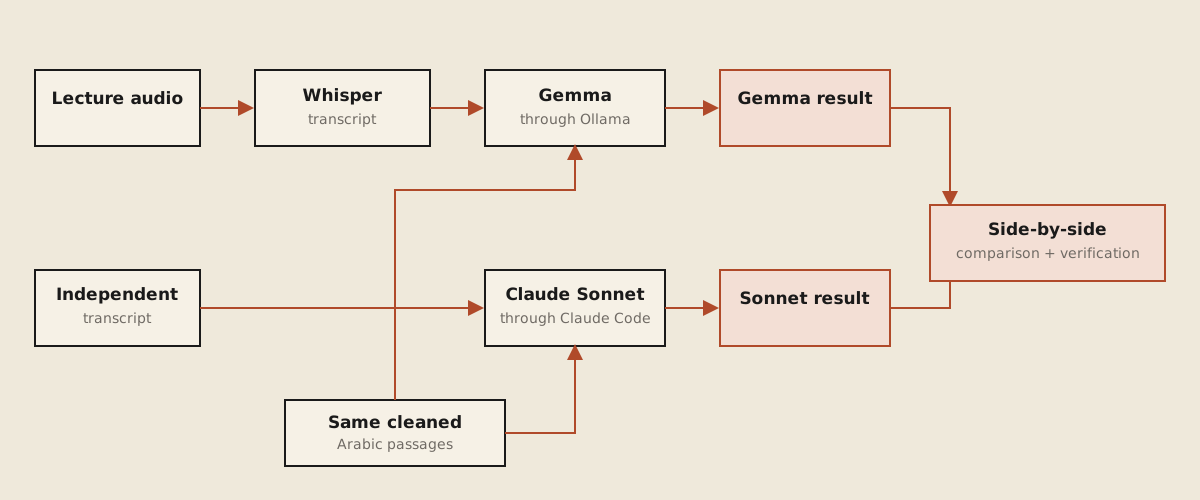
After testing the local pipeline, I processed the same chapter with Claude Sonnet. It was a way to measure the local workflow against a stronger hosted model.
The two paths were kept separate. Gemma used the transcript produced locally by Whisper, while Sonnet used another independently produced transcript of the same lecture. The only shared input was the cleaned collection of Arabic source passages. The local models were accessed through Ollama; Claude Sonnet was run directly through Claude Code using the same translation and faithfulness requirements.
| Result | Gemma pipeline | Sonnet |
|---|---|---|
| Translation | 36m 21s | 4m 19s |
| Arabic placement | 53m 4s | 4m 3s |
| Total | ~89m 25s | ~8m 22s |
| Correct relevant placements | 3/4 | 4/4 |
| Incorrect placements | 0 | 0 |
| Repetition failures | 1 batch | 0 |
| Invented names | 1 | 0 |
Sonnet was about eleven times faster and produced the better result in this test. It placed all four relevant Arabic passages, while Gemma placed three and missed one.
The difference was also visible in the translation itself. In one hadith, Gemma garbled part of the chain of narration and introduced a name that was not present in the transcript. Sonnet preserved the chain more clearly and transliterated uncertain wording instead of guessing. This was only one spot-check, so I did not treat it as a complete quality score, but it matched the broader problems I found while reviewing the outputs.
Sonnet’s output was not considered to be automatically correct either, I compared both versions and then checked their differences myself against the original lecture and Arabic source. That verification confirmed the placement results shown above.
What I learned
I started this project because I had the same work to repeat for every chapter: transcribe the lecture, translate it, and insert the relevant Arabic passages. I wanted to see how much of that process I could automate locally.
The result is not a perfect one-click translator. It is a repeatable workflow that produces a useful first draft and shows me where I need to review it.
Testing several models also showed me that speed and fluent writing do not guarantee a faithful translation. A result can look polished while omitting text, inventing details, or repeating entire sections. Clear prompts helped, but prompts alone were not enough.
In this test, Sonnet was faster and produced the more accurate result. Gemma was slower and made more mistakes, but it ran locally through Ollama and completed most of the work without a per-chapter API cost. The comparison showed both the value and the current limits of my local setup.
A the end I have a process I can reuse for future chapters, and I understand which parts can be automated and which parts still require my own verification.
Technical details
All local models were run through Ollama. The initial bake-off began with Ollama’s default generation settings; settings were changed while investigating qwen3.5:9b’s empty-output and repetition problems. The final pipeline uses Whisper
smallin int8 mode on the CPU with 30-second audio windows andgemma4:12bthrough Ollama. Arabic placement uses up to three candidates per batch, word-leveldifflibscoring,[N]markers, and a shrinking paragraph pool to prevent duplicate insertion. Claude Sonnet was run directly through Claude Code rather than through Ollama.
Editorial note
The pipeline’s output was used as an initial draft for the chapter blog posts. A friend and I then thoroughly revised and verified each draft to ensure that no errors made it into the published versions.