Full-stack software engineer building useful tools. Constantly learning, with a habit of connecting dots across different domains.
NOTES 13
OPEN →- 01
- 02
- 03
- 04
- 05
Our Self-Healing Cache Wouldn't Stop Healing
A routine deployment finished. About a day later, our worker queue began climbing and reached millions of jobs within a few hours. Automated emails stopped firing, and our webhooks died.
The culprit? A single, silent null value resting quietly in Redis.
This is a write-up of an outage we had, what caused it, and how we fixed it.
How the system works
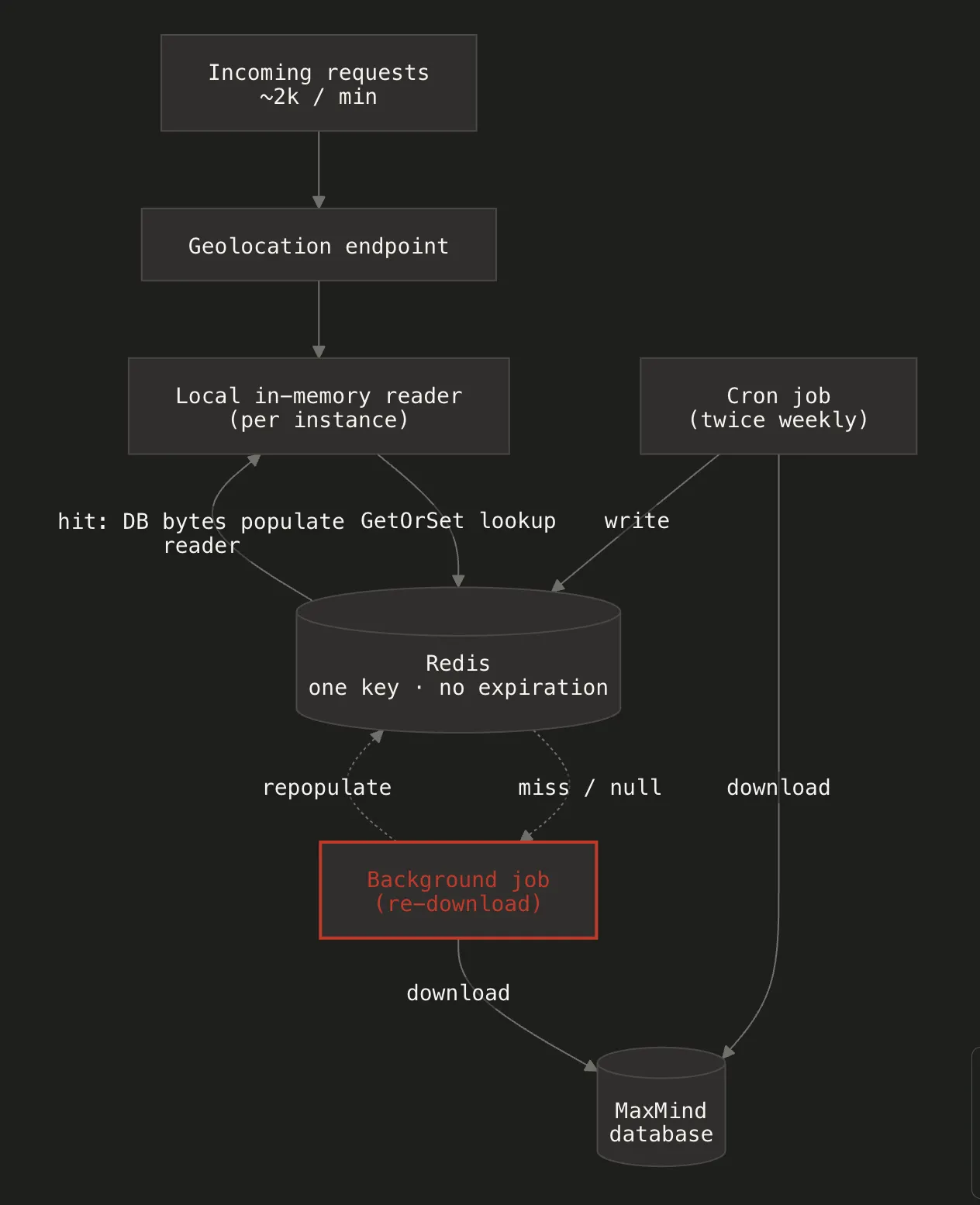
We use a MaxMind database to map IP addresses to locations. One of our endpoints gets a lot of traffic (a couple of thousand requests per minute) and needs fast lookups, so we don’t want to hit a remote service or read from disk on every request.
To handle this, we use two layers:
- A local reader on each server instance. Each instance keeps the MaxMind database in memory and reads from it directly, which is what makes individual lookups fast.
- Redis as the shared cache. The database is also cached in Redis under one key, with no expiration. This is the shared source that all instances pull from to populate their local reader.
We did it this way for two reasons:
- Deployments: When a new instance comes up after a deploy, it fetches the database from Redis instead of downloading it from MaxMind itself. That’s faster, and it means every instance starts from the same copy.
- Twice-weekly upgrades: A cron job updates the database in Redis twice a week. Because Redis is shared, every instance picks up the new version from one place rather than each one downloading separately.
There was also a fallback: if the cache is ever missing, the endpoint queues a background job to re-download the database from MaxMind and repopulate Redis. The idea was that if Redis got cleared or reset, the system would fix itself without anyone having to step in.
What went wrong
About a day after a routine deployment, the geolocation service stopped working.
Because the endpoint gets so much traffic, every incoming request found nothing usable in the cache and queued a background job to re-download the database. Instead of one job running, thousands were queued almost immediately. Within a few hours, the queue had grown to millions of jobs.
The worker pool couldn’t keep up, and the resulting resource starvation took down other critical systems, including automated emails and webhooks.
Our self-healing fallback wasn’t healing anything. Every request was independently trying to do the same recovery work at the same time, resulting in a massive cache stampede (or thundering herd).
Finding the cause
I worked through it step by step, checking each part of the chain — the reader, Redis, the background job, the download — on its own instead of assuming any link was fine. Our code hadn’t changed, but the chain also runs through Redis, the MaxMind download, and a third-party library. A boundary you don’t own is exactly where a “this can’t happen” can happen.
- Redeploy first. I redeployed to rule out a one-off problem like a bad container or a glitchy rollout. The issue stayed, so it wasn’t a fluke.
- Check the deploy. I read through the PR for the deployment. There were no changes to the geolocation logic or the Redis caching code. Nothing obvious had changed in our code.
- Look at the behavior. The background jobs kept firing because they thought the data wasn’t in Redis. But if the data were simply missing, the first successful job should have fixed it and stopped the cycle. It wasn’t stopping.
That pointed to one thing: the key probably wasn’t empty, it held an invalid value, like a null or an empty payload. To the recovery logic, a key holding null looks the same as a missing key, so it keeps re-triggering the download forever.
Our code wasn’t supposed to allow that, but it was the only explanation that matched what I was seeing.
Fixing the outage
I asked the devops team to look at the actual value in Redis. A few people were skeptical because, in theory, the code couldn’t write a null. But the only way the system could be behaving like this was if the value was bad, so it was worth checking.
To stop the outage, we simply flushed that one Redis key. The system stabilized right away, the queue cleared, and traffic went back to normal. That also confirmed the null value had been there the whole time.
Finding the root cause
Flushing the key fixed the immediate outage, but it didn’t explain how a null got written in the first place. Reads from Redis happen on every request, but writes are supposed to be rare and controlled — the twice-a-week cron job owns refreshing the key.
So how did our application write a bad value? I went back to the PR and looked more carefully. The application logic hadn’t changed, but we had bumped our caching library, FusionCache, from v2.4.0 to v2.5.0.
Reading the changelog and the issue tracker, the sequence of events clicked into place.
The silent expiration. Our code relies on the twice-a-week cron job to refresh the cache with no expiration. In v2.4.0 that held — writes carried our “never expire” setting. In v2.5.0 the library changed how per-request options were applied: it ignored our configuration and silently fell back to its default ~1-day expiration. So the next write after the upgrade — the cron refresh that ran post-deploy — stamped a 1-day TTL onto the Redis key instead of “never.” A day later, that key expired for the first time.
The GetOrSet trap. One day after the deployment, the Redis entry expired. The next incoming request saw a cache miss and triggered a GetOrSet. On a hit, that GetOrSet just reads the database bytes back from Redis; on a miss, as we’ll see, our factory deliberately returns null instead of downloading.
The override that got ignored. On a Redis miss, our factory does something deliberate — it returns null and never downloads, because repopulation is the cron/background job’s responsibility, not the request path’s. To make that safe, we set Duration, DistributedCacheDuration, and JitterMaxDuration all to TimeSpan.Zero, meaning “if all you have is this null, don’t cache it anywhere.”
await _hybridCache.GetOrSetAsync<byte[]>(
    AppConstants.MaxMindDatabaseCacheKey,
    async () =>
    {
        // The factory intentionally returns null. The database bytes
        // come from the distributed cache; we never want a request
        // to download the database if it isn't already present.
        return null;
    },
    options =>
    {
        options.Duration = TimeSpan.Zero;
        options.DistributedCacheDuration = TimeSpan.Zero;
        options.JitterMaxDuration = TimeSpan.Zero;
    });
In v2.4.0 that worked: the null was discarded and the next request retried.
The poison pill. Because v2.5.0 ignored our per-request options, it ignored that TimeSpan.Zero override. It fell back to its default behavior and happily cached the null value directly into Redis.
Boom. The trap was set.
Now Redis held a cached null. Every single one of our requests hit Redis, retrieved the null, recognized it wasn’t valid MaxMind data, and queued a background job to fix it. We had accidentally engineered a perpetual cache stampede.
The fixes
I made a couple of changes to ensure this never happens again:
- Fixed the config. Updated our configuration to match the new FusionCache version’s specifications, so the parameters we relied on were used correctly again.
- Throttled the jobs. Added a debounce/idempotency check on the background trigger. Even during a legitimate cache miss under heavy load, only one download job can run at a time.
Takeaways
- When behavior and assumptions disagree, check the behavior. The “impossible” value was right there in Redis.
- Guard your shared state. What looks impossible in one process can still occur across many instances and shared state. Design for it, and don’t fully trust the parts you don’t own. A cached
nulllooks like a miss but never resolves — guard against it directly. - A small version bump isn’t always small. Default behaviors can change between versions. Dependency updates that touch core infrastructure deserve a careful look, and the changelog is a good first place to check.